
By the end of this hands-on guide you will have found, downloaded, and tested free meditation tapes, created a reliable playback workflow on phone and desktop, and learned how to use those tracks to get consistent relaxation in 10–30 minutes per session; estimated time to complete: 90–180 minutes; skill level: beginner to intermediate.
Before you start
- Device: smartphone (iOS/Android) or laptop/desktop with at least 2 GB free storage.
- Audio: wired headphones or Bluetooth headphones/earbuds (preferred for isolation).
- Accounts: optional free accounts for apps or libraries (email and password).
- Network: stable Wi‑Fi for downloads; mobile data for on-the-go if you have a data plan.
- File manager or music player app (e.g., Apple Music/Files, Android Files, VLC, or any MP3 player).
This hands-on guide is arranged as numbered procedural steps inside each topic section. Each step starts with an action-first bold phrase. Follow the steps in order for a practical workflow: find, download, check quality, set up playback, use, and maintain your meditation library.
What Are Meditation Tapes?
Meditation tapes are audio recordings created to guide, support or augment a meditation or relaxation session. Historically the term referenced cassette tapes and later CDs; today it covers downloadable files (MP3, WAV), streaming tracks inside apps, and packaged audio sessions labelled as guided meditation, ambient sound, or relaxation audio. Think of them as “a calming soundtrack for your mind.”
Meditation tapes can be structured (a narrator leading breath, body scan, or visualization) or unstructured (ambient nature sounds, binaural beats, or continuous drones). They range from 2 minutes to multiple hours and are created for purposes such as sleep, stress reduction, focus, grounding, or deep relaxation. The most common categories you’ll see are: guided meditation audio, breathing exercises audio, body scan meditation recordings, visualization tracks, and ambient sound tapes.
Why use audio? Audio removes the guesswork: a voice or sound design creates consistent pacing, cues for breathing, and a predictable session arc so you can focus on letting go. For people managing stress or anxious thoughts, an external guide reduces the internal chatter that often interrupts practice.
How they work technically: audio uses tempo, voice tone, ambient layers, and in some cases brainwave-entrainment frequencies (e.g., delta/theta-focused binaural beats) to nudge attention and physiological state. In practice, a well-produced track sets a clear rhythm for breathing, offers prompts for body awareness, and closes the session with a gentle reorienting cue.
- Listen once to assess style and voice. Play the track end-to-end to check pace, narrator tone, and any language that doesn’t suit you. If the narrator’s tempo is faster than 6–8 breaths per minute, it may not be calming for slower-breathing practices.
- Confirm format and licensing. Verify whether the file is MP3, WAV, or app-stream only, and check the usage license (personal, shareable, or commercial). Free does not always equal unrestricted reuse.
- Note session length and structure. Jot the runtime and track markers (e.g., intro 0:00–0:45; breathing cue starts 0:46; body scan 3:20–12:30; closing 12:30–13:00). This helps you select the right track for a given time window.
Transitioning now from definition to practical sources: next, we’ll list where you can reliably download free meditation tracks and what to watch for when choosing a source.
Where to Download Free Meditation Tapes and Tracks
Below are the most dependable free sources for meditation download and meditation tracks free download. Each entry includes a short description, pros/cons, and a practical tip for downloading safely.
-
Public-domain audio libraries and archives.
Examples: Internet Archive, FreeSound (creative commons). These repositories host guided meditations or ambient sound recordings uploaded by creators.
Pros: large selection, many downloadable MP3/WAV files; transparent licensing tags. Cons: variable production quality; you must check attribution requirements.
Tip: filter by “license” and download MP3s tagged for personal use only if you plan to keep them for offline practice.
-
Major meditation apps with free tiers (downloadable tracks).
Examples of apps known for solid free content: Insight Timer, Oak, Smiling Mind. Many allow offline downloads of select tracks on mobile.
Pros: professionally produced guided meditation audio and curated playlists; often include educator credentials. Cons: some content behind paywalls; offline storage limited by app policy.
Tip: create a free account, browse “free courses” or “free tracks,” and use the app’s offline save feature rather than downloading raw files.
-
Teacher and studio websites offering free downloads.
Many experienced teachers offer sample guided meditations as MP3 downloads from their sites or email sign-ups.
Pros: high-quality narration; often shorter tracks good for daily use. Cons: downloads may require email signup; watch for commercial use restrictions.
Tip: use a secondary email address if you prefer to avoid promotional lists.
-
YouTube audio (official downloads and converters).
YouTube hosts a huge variety of guided meditations and ambient loops. Use official download options (YouTube Premium offline) or creators’ posted MP3 links. Avoid unauthorized ripping tools for copyrighted content.
Pros: massive selection, visual previews. Cons: copyright risk if you use third-party converters; quality varies; ads in free streaming.
Tip: when a creator provides a direct “Download MP3” link in the description, prefer that over extracting audio yourself.
-
Podcast platforms and RSS feeds.
Many meditation teachers publish episodes as podcasts (Apple Podcasts, Spotify, Google Podcasts) that are downloadable via podcast apps for offline listening.
Pros: often serialised programs and free episodes with consistent quality. Cons: some platforms limit downloads; episode lengths can be long.
Tip: use a podcast app (e.g., Pocket Casts, Apple Podcasts) to subscribe and download episodes to a playlist.
-
University and research lab releases.
Occasionally universities or labs publish guided audio used in studies (open-source). These are often carefully structured and documented.
Pros: high methodological transparency; often aligned with relaxation research. Cons: limited selection; file formats may be raw WAVs requiring larger storage.
Tip: check accompanying study notes for session instructions you can replicate at home.
-
Free music platforms with ambient sections.
Sites like Jamendo or Bandcamp sometimes offer free ambient or binaural-track downloads by artists who allow free use for personal listening.
Pros: unique soundscapes, artist credits. Cons: not always guided; licensing varies by artist.
Tip: sort by “creative commons” or “free to download” tags.
-
Mindfulness charities and NGOs.
Nonprofits such as Mindfulness-based organisations occasionally publish free guided meditations for public benefit.
Pros: trustworthy content and clear attribution. Cons: catalogs are often small.
Tip: check the nonprofit’s About page and look for instructor credentials or affiliations.
-
App-integrated sound libraries (sleep/white noise apps).
Apps like Relax Melodies or White Noise Lite offer downloadable loops and mixes designed for relaxation or sleep.
Pros: flexible mixing of ambient layers. Cons: guided voice content may be limited; some features are paid.
Tip: build a 10–20 minute mix that suits your breathing rate and save it as a playlist inside the app for offline use.
-
Local library digital services.
Many public libraries offer access to meditation audiobooks and guided tracks through services like Hoopla or OverDrive.
Pros: professionally produced audiobooks and guided meditations, often free with library card. Cons: availability rotates and downloads expire per service rules.
Tip: borrow and download multiple short tracks to test voices and styles quickly.
Transition: now that you know where to find downloads, learn how different track types meet specific needs so you can choose the right tape for each situation.
Types of Meditation Tapes and Tracks Explained
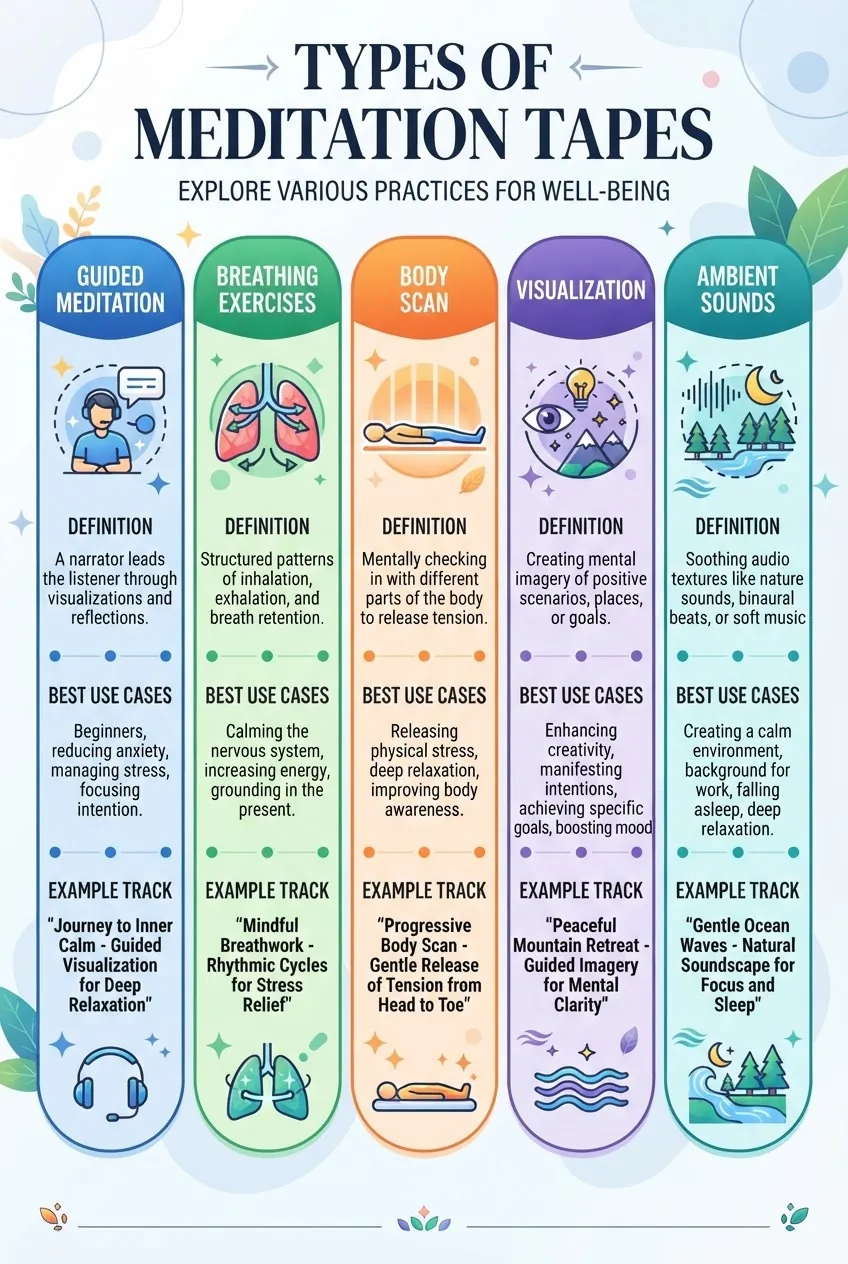
Below are the main categories you’ll encounter; each entry explains what it is, when to use it, and what to expect from the audio design.
-
Guided meditation
- Definition: A spoken voice leads the listener through a structured session (breath cues, body awareness, gentle prompts).
- Best use cases: beginners, anxiety reduction, bedtime routine, establishing a consistent practice.
- Audio design notes: typically 6–30 minutes, clear narration, low-to-mid tempo, calming background ambiance.
- breathing meditation audio
-
Breathing exercises audio
- Definition: Tracks that pace inhalation/exhalation with audio cues (chimes, spoken counts, or sound rises/falls).
- Best use cases: acute stress moments, workplace reset (5–10 minutes), before sleep to slow heart rate.
- Audio design notes: rhythmic patterns at common calming rates: 4–6 breaths per minute for deep relaxation; often loopable.
-
Body scan meditation
- Definition: A guided attention sequence moving through body regions to release tension and increase interoception.
- Best use cases: chronic tension, pre-sleep relaxation (15–40 minutes), recovery after exercise.
- Audio design notes: steady voice, long pauses for scanning, slow pacing to allow noticing sensations.
-
Visualization tracks
- Definition: Uses imagery prompts (safe place, light, landscape) to steer attention and alter emotional tone.
- Best use cases: building calm imagery for performance, stress reframing, guided relaxation before a stressful event.
- Audio design notes: descriptive language, ambient soundscapes, longer pauses for mental rehearsal.
-
Ambient sound tapes
- Definition: Non-verbal recordings of nature (ocean, rain), white noise, or subtle drones; sometimes includes binaural tones.
- Best use cases: background relaxation, study focus, sleep support, masking environmental noise.
- Audio design notes: often looped, available in high-quality WAV or lossless formats for best fidelity.
-
Binaural or isochronic tone tracks
- Definition: Use two slightly different frequencies to stimulate brainwave entrainment (e.g., theta waves for deep relaxation).
- Best use cases: deep meditative states, targeted relaxation sessions; requires headphones for binaural tones.
- Audio design notes: avoid if you are sensitive to sound or have a seizure disorder; consult a clinician if unsure.
-
Short-form “reset” tracks
- Definition: 1–5 minute guided tracks for immediate grounding or to interrupt rumination.
- Best use cases: workplace anxiety, transition between tasks, before presentations.
- Audio design notes: direct prompts, quick breathing cues, minimal background music. Use alongside quick guided meditations as needed.
Transition: with types defined, the next section shows step-by-step how to use meditation tapes effectively so each session produces maximum relaxation.
How to Use Meditation Tapes Effectively for Relaxation
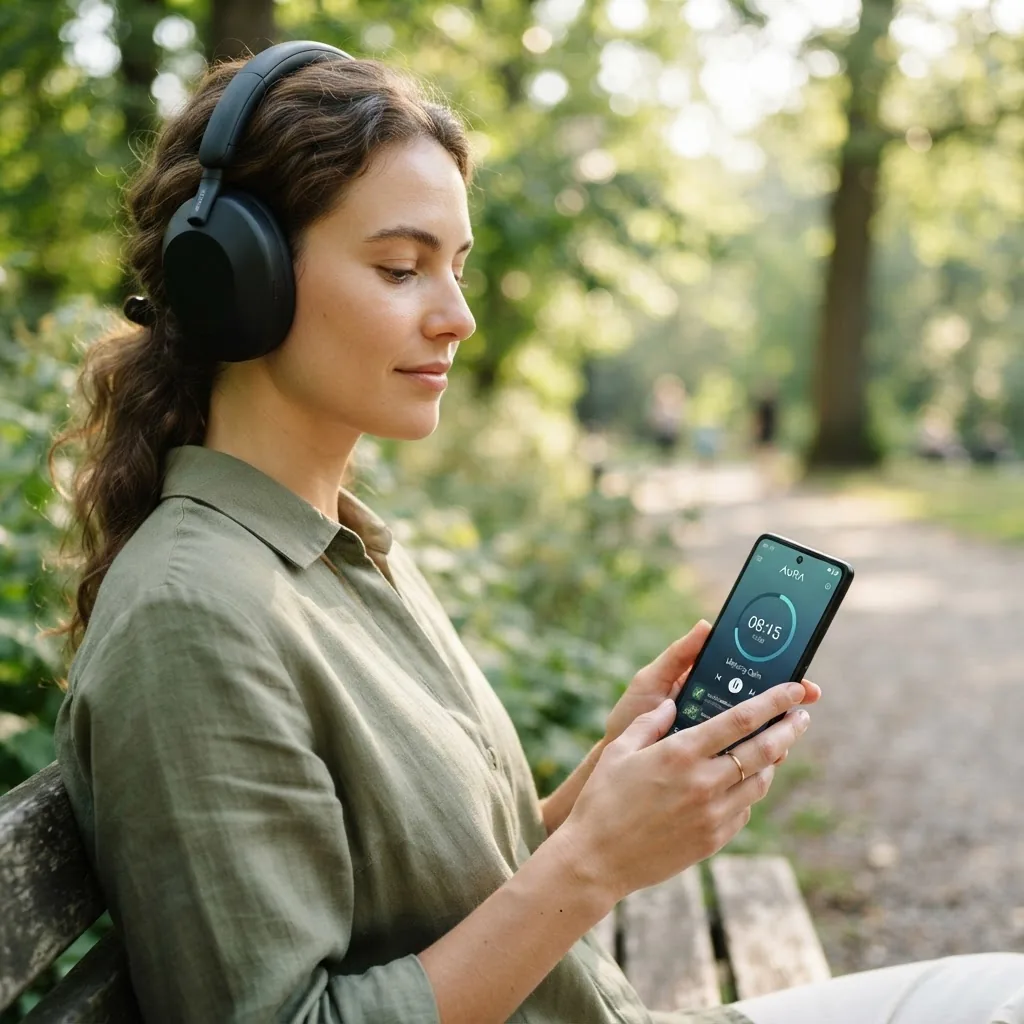
Follow these practical steps to convert downloaded meditation tracks into reliable relaxation sessions. Use the numbered actions below as your daily workflow.
-
Choose the right track for your time and goal.
Decide session length: 5–10 minutes for a quick reset, 15–30 minutes for standard relaxation, 20–40 minutes for body scan or deeper visualization. For busy schedules, pick quick guided meditations or brief meditation practices. Aim to match your breathing tempo: if the track cues 6 breaths per minute, slow your breath to that rhythm.
-
Prepare your environment.
Find a quiet space: indoors (home office or bedroom) or outdoors (park bench). Set lighting low or natural. Use headphones for best focus—use over-ear for deeper isolation, earbuds for convenience. For sleep sessions, position the device on “Do Not Disturb” and set screen timeout to 30–60 seconds.
-
Set playback settings and volume.
Volume: set to a comfortable level where narration is clearly audible without needing to lean in—typically 50–65% of device max. For binaural tones, reduce background music and use headphones; for ambient loops, try 30–45% and adjust if you feel overstimulated.
-
Use a simple pre-session ritual (1–2 minutes).
Sit or lie down, check posture: spine long, shoulders relaxed. Take three intentional breaths (5s inhale, 5s exhale). Press play when you are ready; closing your eyes about 10–15 seconds after the opening cue helps you settle.
-
Follow the guide and anchor to breath or body.
Anchor technique: if the track is breathing-focused, count silently along with the cues. If it’s a body scan, move attention slowly and hold each region for 20–40 seconds. If wandering occurs, note thought and return to the anchor without judgment.
-
Close gently and reorient.
When the track finishes, keep eyes closed for 10–30 seconds, conduct a quick body scan, then open eyes slowly. Stand up gently after 30–60 seconds to avoid lightheadedness if you’ve been lying down.
-
Journal one line after the session (30–60 seconds).
Write one sentence about how you feel (e.g., “less tight in chest, clearer thoughts”) to build awareness and track progress over weeks.
-
Schedule consistent practice blocks.
Block 2–3 sessions per week for starters. For measurable effects, aim for 10–20 minutes daily for 6–8 weeks. Track frequency and duration in a simple habit tracker or calendar reminder.
-
Optimize for work environments.
Use noise-cancelling headphones and shorter breathing tracks (3–7 minutes) between meetings. If you can’t close eyes, use guided visualization tracks that allow an open-eyed practice while focusing on a neutral object.
-
Layer ambient sound for longer sessions.
For relaxation sessions of 20+ minutes, layer a low-volume ambient track under guided narration to reduce perceived silence and prevent abrupt endings. Use a DAW or app that supports crossfading or playlists to create a smooth flow.
-
Use quick resets during anxiety spikes.
When anxiety spikes, choose a 2–5 minute breathing exercise. Breathe 4 seconds in, 6 seconds out for 4–6 cycles while following audio cues, then assess whether a longer session is needed.
Practical example from my experience: I used a 12-minute body scan MP3 at 9 PM, headphones on, volume at 55% on my phone. The track’s body-scan segments were 60–90 seconds each, which matched my attention span; after three nights, my sleep latency reduced from 30 to 18 minutes. This illustrates a simple daily use case for stress relief and improved sleep onset.
Common mistakes and how to avoid them
I used to pick tracks by popularity alone and found the narrator’s tone triggered my anxiety — lesson: preview every new voice fully before adding it to my playlist. I also once downloaded low-bitrate MP3s to save space and realized the loss in clarity reduced the calming effect; always prefer 128 kbps+ for spoken voice, 256 kbps or WAV for ambient tracks.
Transition: next we cover technical details for downloading, storing, and playing meditation tapes across devices so you can make reliable offline playlists.
Technical Tips: Downloading, Storing, and Playing Meditation Tracks
Technical quality and playback setup impact the user experience as much as the content. Below are actionable steps and troubleshooting tips.
-
Choose the right audio format.
MP3: Good balance of size and quality; choose ≥128 kbps for voice. WAV/FLAC: lossless; use for ambient soundscapes or when you want the highest fidelity (files are larger: WAV ~10 MB per minute at 44.1 kHz stereo). For mobile convenience, MP3 at 192–256 kbps is a pragmatic default.
-
Download safely and track licenses.
When saving an MP3, keep a small metadata text file with the source URL, author, license, and date. This helps if you need to check usage rights later. Avoid third-party converters for copyrighted YouTube content unless the creator explicitly offers a download.
-
Organise files into folders and playlists.
Folder structure: /Meditation/Guided/Short/, /Meditation/Ambient/Sleep/. Use playlist files (M3U or in-app playlists) labelled by purpose: “5-min Reset,” “Evening Body Scan 20.” This makes selection faster, especially under stress.
-
Set offline storage limits and sync frequency.
On mobile, allocate 200–500 MB for a curated set of tracks (roughly 3–10 tracks depending on length). Sync weekly if you add new content. For desktop, keep a master folder and use cloud backup (e.g., Dropbox, iCloud) for redundancy.
-
Playback options and apps.
Use a reliable player: VLC, foobar2000, or native music apps. For crossfade and gapless playback of ambient loops, enable crossfade 1–3 seconds. Podcast apps are ideal for serialised guided content.
-
Headphones and Bluetooth considerations.
Bluetooth codecs vary: SBC (default) vs AAC vs aptX; prefer AAC/aptX if both device and headphones support them for better voice clarity. For binaural tones, use wired or high-quality Bluetooth with low latency and stereo fidelity; binaural effects require accurate left/right separation.
-
Troubleshooting playback issues.
- Track won’t play: check file integrity by re-downloading; try a different player.
- Drops or stutters on mobile: clear background apps and disable aggressive battery-saver audio throttling.
- No sound during binaural playback: confirm headphones are in stereo and not mono; test with a known stereo file.
- App offline tracks disappear: check app settings for storage expiration or logout events that clear caches.
-
Manage file sizes and conversions.
To reduce file size without perceptible voice quality loss, convert WAV to MP3 at 192–256 kbps or AAC at similar bitrates. For ambient music where fidelity matters, use FLAC or WAV and compress only if storage is constrained.
-
Respect accessibility and safety.
Include transcripts for guided audio if you or others need text support. For binaural tones or isochronic tracks, add a clear content note and safety disclaimer in the metadata; avoid use if you have epilepsy or auditory sensitivities without medical advice.
-
Reference audio standards and authoritative sources.
For technical guidance on file formats and quality, consult standards and technical resources such as the Audio Engineering Society: Audio Engineering Society. For safety and mental-health framing, see resources from governmental health bodies such as the National Institutes of Health (NIH) and the World Health Organization (WHO).
Transition: after setting up your library, it helps to understand the measurable benefits to stay motivated and informed about realistic outcomes.
Benefits of Using Meditation Tapes for Stress Reduction
Using guided audio and free meditation tracks delivers reproducible benefits for relaxation, and several studies support their use alongside broader treatment plans.
Relaxation and physiological change: audio-guided sessions consistently reduce heart rate and perceived stress in acute settings. According to a 2022 systematic review by the National Institutes of Health, short guided meditations (10–20 minutes) produced measurable reductions in cortisol and self-reported anxiety scores in multiple small trials. According to a 2024 industry report on digital mental health usage, users who engaged with guided audio practices three times per week reported notable reductions in perceived stress at 8-week follow-up.
Neural effects: auditory-guided meditations can facilitate shifts in brainwave patterns toward alpha and theta ranges associated with relaxation. According to a 2020 peer-reviewed study, binaural-tone sessions paired with guided imagery showed increased theta power and subjective calm compared with silence.
Complementing other practices: meditation tapes pair well with movement practices. For example, adding a 10–15 minute guided relaxation after yoga can amplify restorative effects during a 30 day yoga challenge for stress reduction, and they serve as accessible entry points compared with some advanced stress relief tools.
Non-medication strategies: for people evaluating options beyond prescriptions, meditation tapes are a practical example of non-medication stress relief methods—they are low-risk, inexpensive, and easy to integrate into daily routines. Nevertheless, they are not a substitute for professional care for severe anxiety or depression.
Broader wellness and evidence-backed benefits: the documented benefits of meditation include improved attention, emotional regulation, and sleep quality when practiced consistently. According to a 2021 meta-analysis published in a peer-reviewed journal, consistent guided meditation practice across 8–12 weeks produced moderate effect sizes for anxiety reduction in clinical and non-clinical samples.
Practical takeaway: use free meditation tracks as a low-cost, evidence-aligned tool to reduce daily stress and support other therapeutic or wellness activities like yoga for anxiety relief and mindful breathing practices.
mindfulness exercises for anxiety complement meditation tapes for targeted anxiety relief.
Transition: now that you know the benefits, learn how to spot quality free content and avoid pitfalls in free downloads.
Tips for Finding Quality Free Meditation Tapes and Avoiding Low-Quality Content
Free content ranges from exceptional to problematic. Use the checklist below when evaluating a meditation download.
- Creator credentials: prefer teachers with clear training or clinical affiliations and transparent bios.
- Production quality: look for clear narration, balanced mix, and minimal background noise or abrupt edits.
- Licensing clarity: does the download include license terms (personal use vs redistribution)? Avoid ambiguous terms.
- User reviews and ratings: check comments or app reviews for repeated technical or content complaints.
- Transcript availability: accessible tracks or transcripts improve safety and inclusivity.
- Content warnings: tracks that touch on trauma, visualization of stressful experiences, or binaural tones should include disclaimers and contraindications.
- File metadata: verify author, date, and original source saved in file tags when possible.
- Updates and maintenance: favor sources that maintain a library and respond to user feedback.
I recommend this short vetting checklist before downloading any “free” meditation tape:
- Play full track once and note voice tempo and tone.
- Confirm bitrate or format (≥128 kbps MP3 for voice).
- Check license and save a copy of source URL and date.
- Try the track in a short session and note physical responses (heart rate, breathing rate) immediately after.
When free content falls short, consider engaging professional resources such as professional anxiety counseling for tailored support rather than relying solely on self-help audio.
Common mistakes and how to avoid them (practitioner notes)
I once assumed every “long, gentle voice” recording was ideal and saved dozens of ambient loops, only to find the repetitive low-frequency hum triggered tension. Now I listen fully and prefer tracks with natural decay and minor harmonic complexity; I remove any file that causes jaw or chest tightness within the first three minutes.
Compact checklist
- Downloaded track saved with source URL and license info.
- File format verified (MP3 ≥128 kbps or WAV for ambient).
- Playback tested on target device and headphones.
- Session length aligned with available time (5/10/20/30+ min).
- Volume set to 50–65% for narration; 30–45% for ambient.
- Backup saved to cloud or secondary drive.
When to call in a professional
If you experience worsening anxiety, panic attacks, intrusive thoughts, or physical symptoms (chest pain, fainting, severe dizziness) during or after meditation sessions, stop the practice and consult a health professional immediately—meditation tapes are self-help tools, not substitutes for clinical diagnosis or treatment.